The Complete Guide to Keyboard Switches: Types, Feel, and How to Pick the Right One
Keyboard switches are one of the core elements of any mechanical keyboard, yet many users don’t fully understand how much they influence the overall experience. Whether you’re gaming, working in an office, or typing for long hours, the switch under each key directly shapes how fast, comfortable, and satisfying your keyboard feels.
With the rise of mechanical keyboards in enthusiast communities and productivity setups, switch customization has become a major topic. From Reddit discussions to hardware reviews, users increasingly focus on refining typing feel rather than just choosing a keyboard brand.
This guide breaks down keyboard switches in a practical way—how they work, the different types, and how to choose the right one for your needs.
What Are Keyboard Switches and Why Do They Matter?
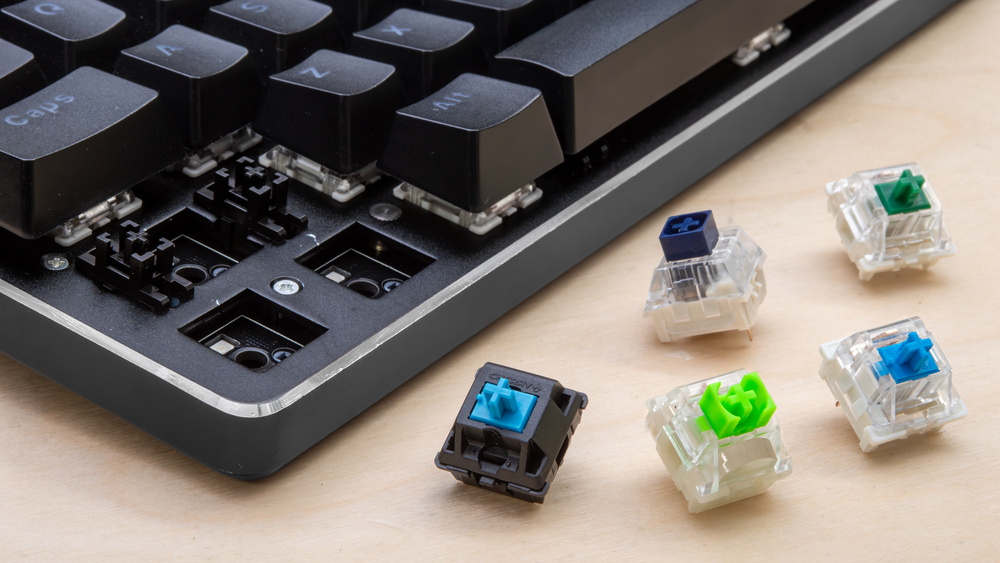
Keyboard switches are the individual mechanical mechanisms located beneath each keycap. Their job is simple: register a key press when activated. But the way they do this changes everything about the typing experience.
Unlike membrane keyboards, which use a shared rubber layer, mechanical switches rely on a spring-and-stem system. This allows each key to have its own distinct feel and response.
A typical switch includes:
Stem – controls movement and typing feel
Spring – determines resistance and return speed
Housing – holds the internal structure together
Metal contacts – complete the electrical signal
When pressed, the stem moves downward until it reaches the actuation point, triggering a signal to the computer.
Why it matters in real use
Switch design affects:
Typing speed and accuracy
Finger fatigue during long sessions
Noise level in shared environments
Overall comfort and control
Ergonomic studies on input devices have long shown that resistance and feedback can influence long-term strain, especially for users who type for hours daily.
Main Types of Keyboard Switches
Most mechanical keyboard switches fall into three main categories: linear, tactile, and clicky. Each offers a different balance of feel, sound, and feedback.
| Type | Typing Feel | Sound Level | Best For |
| Linear | Smooth, no bump | Low to medium | Gaming, fast typing |
| Tactile | Noticeable bump | Medium | Work, general use |
| Clicky | Bump + audible click | High | Typing enthusiasts |
Linear Switches: Smooth and Fast
Linear switches move straight up and down without any tactile bump or audible click. The keystroke feels consistent from start to finish.
Key characteristics:
Very smooth keypress
Low resistance
Quick actuation response
Minimal noise (especially when lubed)
Ideal for:
Competitive gaming
Fast repetitive input
Users who prefer a smooth typing flow
Popular examples include Gateron Yellow, Cherry MX Red, and Kailh Red.
Linear switches are often chosen for their simplicity and speed, especially in esports setups where rapid reactions matter.
Tactile Switches: Balanced Feedback
Tactile switches include a small “bump” during the keypress, indicating the actuation point without needing to fully bottom out the key.
Key characteristics:
Noticeable tactile feedback
Balanced sound profile
Reduced typing errors for many users
Ideal for:
Office work
Programming and writing
General productivity
Common models include Cherry MX Brown, Boba U4T, and Zealios V2.
Tactile switches are often considered the most versatile option because they provide feedback without being too loud or too smooth.
Clicky Switches: Loud and Satisfying
Clicky switches combine tactile feedback with a distinct audible click sound when the key is pressed.
Key characteristics:
Strong tactile bump
Loud click sound
Highly responsive feedback
Ideal for:
Typing enthusiasts
Users who enjoy audible confirmation
Personal or private workspaces
Popular examples include Cherry MX Blue and Kailh Box White.
While many users enjoy the feel, clicky switches are usually not recommended for shared offices due to noise levels.
How to Choose the Right Keyboard Switch
There is no universal “best” switch. The right choice depends entirely on how you use your keyboard.
For Gaming
Linear switches are generally preferred because they allow fast, uninterrupted key presses with minimal resistance.
Benefits:
Faster reaction time
Smooth repeated inputs
Less finger fatigue in fast-paced games
For Typing and Writing
Tactile switches are often the most comfortable option for long typing sessions.
Benefits:
Clear actuation feedback
Fewer accidental key presses
Comfortable for long documents or coding
For Office Environments
Quiet tactile or silent linear switches work best in shared spaces.
Benefits:
Reduced noise
Comfortable long-term use
Professional environment friendly
Key Factors That Define Switch Quality
Beyond switch type, several technical factors affect performance and feel.
Actuation Force
This is the amount of pressure needed to trigger a key.
Light switches: faster, easier to press
Heavy switches: more control, fewer accidental presses
Travel Distance
Most mechanical switches have a total travel of around 3.5mm–4mm.
Shorter travel can feel faster, while longer travel often feels more traditional.
Sound Profile
Noise levels vary significantly:
Linear: quiet to moderate
Tactile: moderate
Clicky: loud
Keyboard case design, lubrication, and keycaps also affect sound.
Durability
Most modern mechanical switches are rated for 50 to 100 million keystrokes, depending on manufacturer specifications such as Cherry MX standards.
This makes them significantly more durable than typical membrane keyboards.
Which Switch Should You Start With?
If you are new to mechanical keyboards, tactile switches are often recommended as a starting point. They provide a balanced experience that works well for both typing and light gaming.
Once you become familiar with different feels, you can explore more specialized options like smooth linear switches or clicky designs.
Many users also experiment through hot-swappable keyboards, which allow switch changes without soldering.
Conclusion
Keyboard switches play a major role in shaping your typing experience, from feel and sound to speed and comfort. Linear, tactile, and clicky switches each serve different purposes, and none is universally superior.
The best switch is the one that matches your daily usage, environment, and personal preference. Whether you prioritize gaming performance, typing comfort, or quiet office use, understanding switch differences helps you build a more satisfying keyboard setup.
Exploring different switch types is often the best way to discover what truly fits your workflow.
FAQs
What type of keyboard switch is the quietest?
Linear switches are generally the quietest because they lack both tactile bump and click mechanisms. However, keyboard case and keycaps also influence sound.
Are premium keyboard switches worth it?
Not always. While premium switches may feel smoother or have better build quality, many mid-range switches already offer excellent performance for most users.
Can I change keyboard switches on any keyboard?
Only hot-swappable keyboards allow easy switch replacement. Otherwise, switch changes require desoldering and technical modification.
Which switch is best for beginners?
Tactile switches are often recommended for beginners because they provide balanced feedback without being too extreme in sound or feel.